Understanding AXFR Zone Transfers
What Is AXFR?
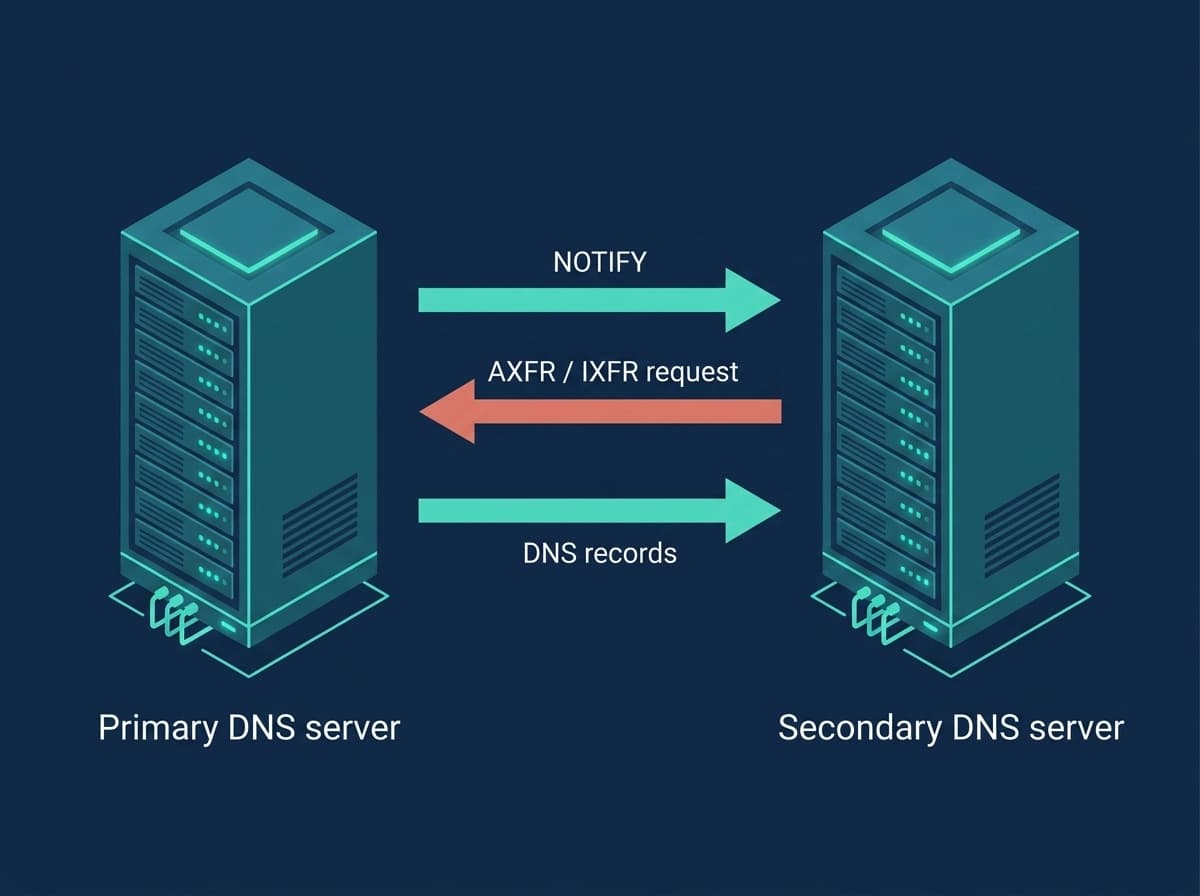
AXFR (full zone transfer) is a DNS protocol mechanism for replicating an entire zone from a primary nameserver to a secondary. When a secondary server needs a copy of a zone, it opens an AXFR request to the primary, which responds with every record in the zone in a single TCP stream.
AXFR is defined in RFC 5936 and runs over TCP on port 53 — not UDP, because a full zone is usually larger than a single UDP datagram. The transfer includes every record in the zone: SOA, NS, A, AAAA, MX, CNAME, TXT, and the rest. In short: AXFR is how a secondary DNS server gets and stays in sync with the authoritative copy of your DNS data.
Full vs Incremental DNS Zone Transfers
There are two types of zone transfer:
AXFR (full transfer): transfers the entire zone every time. Simple and reliable, but uses more bandwidth on large zones.
IXFR (incremental transfer, RFC 1995): transfers only the records that changed since the secondary's last serial. Much more efficient for large zones with frequent small edits.
Most DNS software supports both. A secondary typically tries IXFR first and falls back to AXFR if the primary does not support incremental transfers, if the requested serial is too old to compute a delta, or if the primary's IXFR journal has been truncated. AXFR is therefore the reliable baseline that always works; IXFR is the optimization on top.
How DNS Zone Transfer Works
A zone transfer follows these steps:
1. The secondary checks the SOA record on the primary — either on the refresh timer or when it receives a NOTIFY message. 2. If the primary's SOA serial is higher than the secondary's local copy, a transfer is needed. 3. The secondary opens an AXFR (or IXFR) request to the primary on TCP port 53. 4. The primary checks whether the secondary is allowed to transfer (by IP ACL and/or TSIG) and, if so, sends the zone data. 5. The secondary replaces (AXFR) or patches (IXFR) its local copy and starts answering with the new data.
The SOA record's refresh, retry, and expire timers govern how often the secondary checks for updates and how long it keeps serving when the primary is unreachable.
DNS Zone Refresh and Retry Intervals
The SOA record carries four timing parameters that control zone-transfer behavior:
Refresh: how often the secondary checks the primary for updates (e.g. 3600 = every hour).
Retry: how often the secondary retries if the primary is unreachable (e.g. 900 = every 15 minutes).
Expire: how long the secondary keeps answering for the zone if it cannot reach the primary (e.g. 604800 = 7 days). After expiry, the secondary stops answering for the zone — which is why a long expire protects you during a prolonged primary outage.
Minimum TTL: the negative-caching TTL — how long resolvers cache an NXDOMAIN answer — taken as the lesser of this field and the SOA record's own TTL, per RFC 2308.
For zones that change often, use a lower refresh — but if NOTIFY is configured, refresh matters far less because changes are pushed almost instantly. For stable zones, higher values reduce needless traffic.
For a field-by-field explanation of the SOA record — including serial formats and the mistakes that leave a secondary stale — see What Is a DNS SOA Record.
Real-Time DNS Zone Sync With NOTIFY
Instead of waiting for the refresh timer, the primary sends a NOTIFY message (RFC 1996) to its secondaries immediately after a zone changes. The NOTIFY tells the secondary 'check your serial now', which triggers an SOA check and a transfer if needed.
NOTIFY cuts the delay between a change on the primary and its appearance on secondaries from minutes (the refresh interval) down to seconds.
Most DNS software sends NOTIFY automatically to every server listed in the zone's NS records. For a secondary that is not listed in the NS set — common when you use a provider's hidden or stealth secondary — add it as an explicit also-notify target so it still gets pushed updates.
Testing DNS Zone Transfers With dig
You can request an AXFR by hand with dig to confirm a transfer works — or to check whether your zone is dangerously exposed. Ask a specific server for the full zone:
dig AXFR example.com @ns1.example.comIf the server allows the transfer, dig prints every record in the zone. If it is correctly restricted, you get instead:
; Transfer failed.or a connection that returns no records. That failure is the desired result for a public query — only your authorized secondaries should be able to pull the zone.
From the secondary's side, confirm the serials match after a transfer:
dig SOA example.com @primary-ip +short
dig SOA example.com @secondary-ip +short
Both should return the same SOA serial. If the secondary shows a lower serial, the transfer has not completed — check NOTIFY, the ACL, and TCP port 53.
DNS Zone Transfer Security
An AXFR exposes your entire zone — every hostname, mail server, and TXT record. An open transfer is a classic reconnaissance finding: an attacker who can pull your zone learns your internal naming, staging hosts, and infrastructure layout in one request. Restrict who can transfer:
IP-based ACLs: allow AXFR only from your known secondary server IPs. This is the most common and simplest control.
TSIG (Transaction Signatures, RFC 8945): cryptographic authentication with a shared secret. Stronger than an IP ACL because it cannot be defeated by IP spoofing, and it works even when the secondary's IP changes.
Firewall rules: keep TCP port 53 reachable only from authorized secondaries.
Never use allow-transfer { any; } (or its PowerDNS equivalent). Test your own domains with the dig AXFR command above — if a public query returns records, your zone is open and you should lock it down immediately.
Securing Zone Transfers With TSIG
TSIG adds a shared-secret signature to transfer requests so the primary can authenticate the secondary regardless of its IP. Generate a key, then reference it on both servers.
Generate a key (BIND tooling):
tsig-keygen -a hmac-sha256 transfer-keyThis prints a key block. On the BIND primary, define the key and require it for transfers:
key "transfer-key" {
    algorithm hmac-sha256;
    secret "BASE64_SECRET_HERE";
};

zone "example.com" {
    type primary;
    file "/etc/bind/zones/example.com.zone";
    allow-transfer { key "transfer-key"; };
};
The secondary is configured with the same key name, algorithm, and secret, and presents it when requesting the transfer. Use the same key material on both sides — never commit the secret to version control.
Zone Transfer Configuration Examples
BIND (primary):
zone "example.com" {
    type primary;
    file "/etc/bind/zones/example.com.zone";
    allow-transfer { 192.0.2.1; };
    also-notify { 192.0.2.1; };
};
PowerDNS (primary):
allow-axfr-ips=192.0.2.1/32
also-notify=192.0.2.1
disable-axfr=no
Replace 192.0.2.1 with the actual IP address of your secondary DNS server.
Troubleshooting Zone Transfer Failures
Transfer refused: check the allow-transfer / ACL settings on the primary and confirm the secondary's IP (or TSIG key) matches. Test with dig AXFR from the secondary's network.
Connection timeout: AXFR uses TCP port 53, not UDP. A firewall that only opens UDP 53 for normal queries will let resolution work while silently breaking transfers. Open TCP 53 between primary and secondary.
Serial not incrementing: the primary must raise the SOA serial on every change. With the YYYYMMDDNN format, make sure NN is incremented for multiple edits within the same day, or the secondary will not see a change.
Secondary shows stale data: confirm NOTIFY is configured. Without it, the secondary only updates at the SOA refresh interval.
Large zone transfer fails: very large zones (millions of records) can hit TCP timeout limits mid-transfer. Increase the transfer/timeout settings on both sides, and prefer IXFR so only deltas move.
Don't want to run and troubleshoot your own secondary? SecondDNS provides managed secondary DNS with automatic AXFR sync — start free.
Related Guides
To put zone transfers to work with a secondary DNS service or a hosting panel, see:
- How to Set Up a Secondary DNS Server - DNS Redundancy: Why It Matters and How to Achieve It - Personalized Nameservers: Setup, Glue Records, and Pitfalls - How to Add Secondary DNS to cPanel/WHM - How to Add Secondary DNS to Plesk - How to Add Secondary DNS to DirectAdmin - How to Add Secondary DNS to CyberPanel - Secondary DNS Server: What It Is and How It Works