How to Add Secondary DNS to cPanel/WHM Hosting Panel
Why Your cPanel Server Needs a Secondary DNS
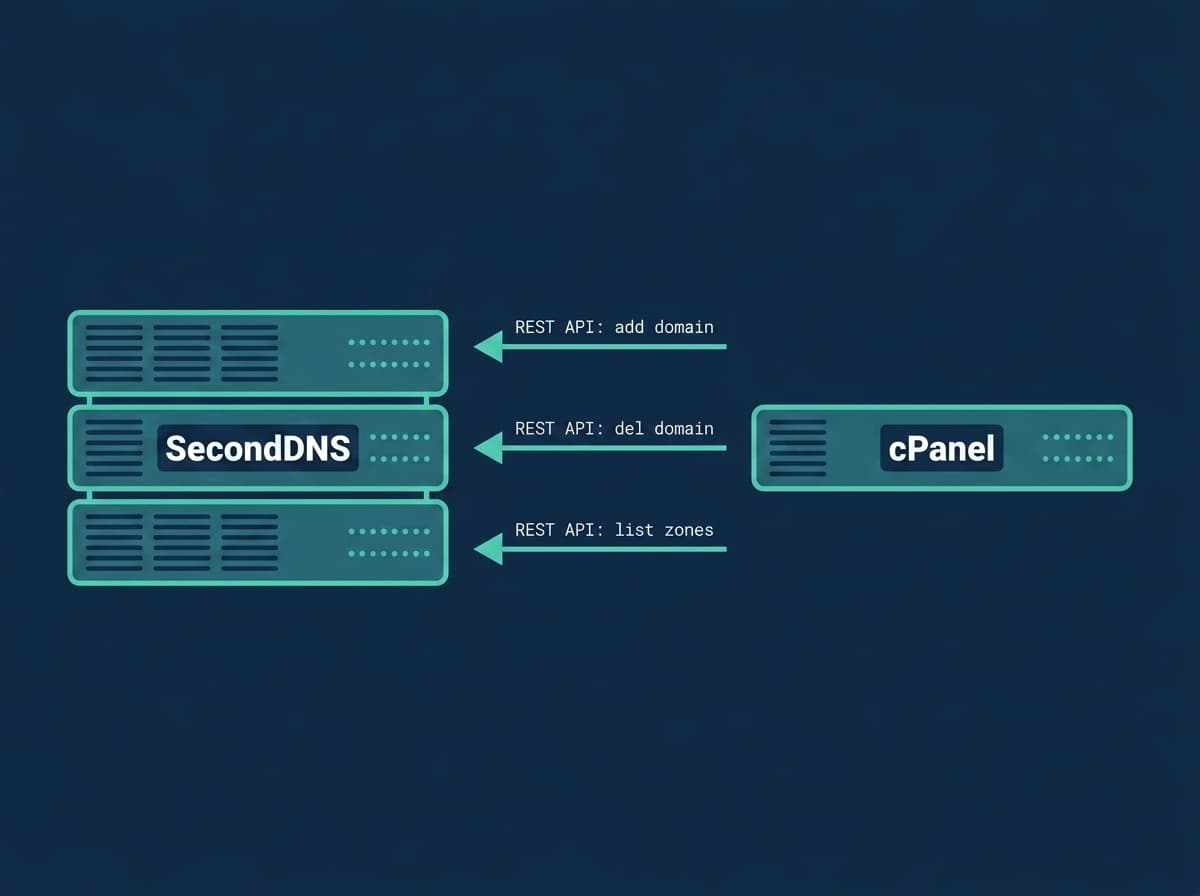
cPanel/WHM servers host dozens or hundreds of domains on a single nameserver. If that server goes offline — for maintenance, hardware failure, or a DDoS attack — every hosted domain becomes unreachable. Visitors get DNS errors, email stops delivering, and services time out.
A secondary DNS server keeps a synchronized copy of all your zones via AXFR (authoritative zone transfer). When the primary is unavailable, the secondary continues answering DNS queries for your domains. Websites, email, and services stay online.
Most domain registrars require at least two nameservers, and RFC 2182 recommends three for production environments. Adding a secondary DNS is not just best practice — it is essential for production reliability.
Don't have a secondary nameserver yet? SecondDNS provides one on a free 3-month trial, no credit card required — get started, then follow the steps below.
Secondary DNS vs DNS Clustering for cPanel
cPanel has a built-in DNS Cluster feature (WHM > Clusters > DNS Cluster) that synchronizes zones between your own WHM servers. It is useful, but it is not the same as an independent secondary DNS:
- A DNS cluster keeps copies on servers you run, often in the same network or data center. If that infrastructure has an outage, every node can go down together. - An off-site secondary like SecondDNS lives on separate infrastructure with its own network and anycast reach. When your cPanel server — or its whole data center — is unavailable, the secondary still answers.
You can run both: a DNS cluster for your own redundancy and SecondDNS as the off-site authoritative secondary that registrars and resolvers fall back to. This guide sets up the off-site secondary via AXFR.
How Secondary DNS Integration Works
The SecondDNS integration for cPanel uses the cPanel Standardized Hooks system — the same mechanism cPanel itself uses internally for plugin events:
1. When a cPanel account is created — the hook registers the main domain zone with SecondDNS via API 2. When an addon domain is added — the hook registers the addon domain zone 3. SecondDNS pulls a full copy of each zone from your server via AXFR 4. When a cPanel account or addon domain is deleted — the hook removes the zone from SecondDNS
Each cPanel account's main domain and every addon domain has its own DNS zone, so each is registered separately. All zone changes are propagated automatically through the DNS NOTIFY mechanism. No manual steps, no cron jobs, no stale records.
BIND and PowerDNS Support
cPanel supports two DNS backends: BIND (named) and PowerDNS, which is the default on current cPanel versions. The installer auto-detects which one is running on your server and configures it accordingly.
BIND: The installer adds allow-transfer and also-notify to the options block of /etc/named.conf. Because cPanel rebuilds the zone declarations in named.conf, the durable place for these directives is the global options block, which cPanel preserves across rebuilds (see Step 2).
PowerDNS: The installer sets disable-axfr=no, allow-axfr-ips, and also-notify, plus primary=yes (on PowerDNS 4.5+; older versions use master=yes). To keep these from being touched by cPanel, they go in a drop-in include under /etc/pdns/pdns.d/ rather than the main pdns.conf.
Here allow-transfer (or allow-axfr-ips in PowerDNS) grants the SecondDNS server permission to pull the zone, and also-notify tells your DNS server to send a NOTIFY so the secondary refreshes immediately after a change.
cPanel Secondary DNS Requirements
Before you begin, make sure you have:
- A current cPanel/WHM version (v102 or later) with BIND or PowerDNS - Root access to the server - A SecondDNS API key (get one at seconddns.com/dashboard/api-key) - Your SecondDNS nameserver IP (find it in the dashboard under Settings > Nameservers) - TCP port 53 open inbound for the SecondDNS server IP
The zone transfer protocol AXFR uses TCP port 53, not UDP. Many firewall configurations only open UDP 53 for regular DNS queries. If TCP 53 is blocked, zone transfers will silently fail even though regular DNS resolution works.
Open TCP Port 53 for DNS Zone Transfers
Before running the installer, open TCP port 53 for the SecondDNS server. Find your nameserver IP in the dashboard under Settings > Nameservers, then replace SECONDARY_IP in the commands below.
If you manage the firewall with firewalld:
firewall-cmd --permanent --add-rich-rule='rule family="ipv4" source address="SECONDARY_IP" port port="53" protocol="tcp" accept'
firewall-cmd --reload
Or with iptables:
iptables -I INPUT -s SECONDARY_IP -p tcp --dport 53 -j ACCEPTIf your server uses a host firewall managed in WHM, add an inbound rule that allows TCP port 53 from SECONDARY_IP.
To verify TCP port 53 is reachable from outside:
nmap -p 53 -sT YOUR_SERVER_IPInstall Secondary DNS on cPanel
Run the one-liner as root:
curl -sL https://raw.githubusercontent.com/seconddns/dns_integrations/main/hosting-panels/cpanel/install.sh | bash -s -- --api-key=YOUR_API_KEYThe installer will: - Verify your API key against the SecondDNS API - Detect your server IP address (IPv4 and IPv6) - Ask which IP to use if both protocols are available - Auto-detect your DNS backend (BIND or PowerDNS) and ask you to confirm - Configure AXFR for the detected backend - Add the SecondDNS nameserver to all zone templates in /var/cpanel/zonetemplates/ so every new zone includes it automatically - Register 5 WHM hooks via manage_hooks - Offer to sync all existing cPanel accounts
Replace YOUR_API_KEY with the key from your SecondDNS dashboard.
Verify Zone Transfer Configuration
PowerDNS: The installer adds the AXFR directives as a drop-in include under /etc/pdns/pdns.d/ so cPanel does not overwrite them on a rebuild. Verify them:
grep -rE 'primary|master|disable-axfr|allow-axfr-ips|also-notify' /etc/pdns/pdns.conf /etc/pdns/pdns.d/After any change, restart PowerDNS:
systemctl restart pdnsBIND: cPanel rebuilds the zone declarations in /etc/named.conf, but it preserves the global options block. So the durable place for the AXFR directives is inside options { ... }. Confirm they are there (replace SECONDARY_IP with your nameserver IP from the dashboard):
allow-transfer { SECONDARY_IP; };
also-notify { SECONDARY_IP; };
The installer adds these to the options block automatically. After editing named.conf, apply the change with:
rndc reconfigIf transfers work at first and break after a cPanel rebuild, the directives were placed in a zone clause rather than the options block — move them into options { } so they survive.
Sync Existing Domains to Secondary DNS
The installer offers to sync all existing cPanel accounts during installation. If you skipped that step, run the sync later:
seconddns syncThis compares your local zones against SecondDNS and adds any missing ones. The command is idempotent — safe to run multiple times. To check one zone or list everything on the secondary:
seconddns status example.com
seconddns list
The zone template change (adding the secondary NS record) only affects new zones created after installation. For existing domains, add the NS record manually via WHM > DNS Functions > Edit DNS Zone, or let the sync register the zones on the secondary.
Deleting is separate: plain `seconddns sync` only adds. To also remove zones this panel no longer serves, run `seconddns sync --prune` — it refuses when it would drop more than half of this server's zones, which is what an unreadable panel looks like.
Verify Your cPanel Secondary DNS Setup
Create a test account in WHM and watch the hook log:
tail -f /var/log/seconddns.logYou should see:
Zone created: testdomain.com (cpanel hook)
[+] Zone testdomain.com added to SecondDNS
Then query both nameservers. Replace SECONDARY_IP with your nameserver IP from the dashboard:
dig @YOUR_SERVER_IP testdomain.com SOA +short
dig @SECONDARY_IP testdomain.com SOA +short
Both should return the same SOA serial in YYYYMMDDNN format. If the secondary shows a lower serial or returns SERVFAIL, check TCP port 53 access and the hook log.
Supported cPanel DNS Events
The integration registers hooks for these cPanel events:
- Account creation — registers the account's main domain zone - Account removal — removes every zone of the account: main domain, addon domains and aliases - Domain added (`park`) — addon domains, aliases and parked domains all arrive through this event - Domain removed (`unpark`) - Main domain renamed — removes the old zone and registers the new one
Each main domain, addon domain and alias has its own DNS zone in cPanel, and each is registered separately. Subdomains live as records inside their parent zone, so they reach the secondary with the parent's transfer.
IDN domains: WHM does not accept Unicode in the domain field — enter an internationalised domain in punycode (`xn--…`). The integration passes it through unchanged.
If SecondDNS Is Unreachable
Zone changes are never sent straight to the API. Every hook writes the operation to a local queue, and a background worker delivers it in order, retrying with a growing delay while SecondDNS is unreachable — a maintenance window or a network problem costs nothing, and nothing your customers do in the panel is lost.
Check the queue at any time:
seconddns statuspending=0 failed=0 oldest_age_seconds=0 last_error=A non-zero `pending` with a `last_error` means delivery is waiting, not that anything was dropped. `failed` counts operations SecondDNS rejected outright; `seconddns-queue retry --all` requeues them.
Troubleshooting cPanel Secondary DNS
Zone not appearing on secondary Check the log at /var/log/seconddns.log. Verify the hooks are registered:
/usr/local/cpanel/bin/manage_hooks listYou should see 5 SecondDNS hooks (Accounts::Create, Accounts::Remove, Domain::park, Domain::unpark, Accounts::Modify). If they are missing, re-run the installer.
AXFR refused (BIND) Make sure allow-transfer is inside the options block of /etc/named.conf, not in a single zone clause. The options block is what survives a cPanel rebuild. Apply changes with rndc reconfig.
AXFR refused (PowerDNS) Check allow-axfr-ips in /etc/pdns/pdns.conf and restart PowerDNS:
grep allow-axfr-ips /etc/pdns/pdns.conf
systemctl restart pdns
Connection timeout Verify TCP port 53 is open between your server and SecondDNS. AXFR uses TCP, not UDP. The most common cause of failed transfers is TCP 53 blocked at the firewall while UDP 53 is open.
Test a hook manually
echo '{"domain":"example.com"}' | bash /usr/local/bin/seconddns-cpanel-domain_create.shUninstalling
To remove the integration:
curl -sL https://raw.githubusercontent.com/seconddns/dns_integrations/main/hosting-panels/cpanel/uninstall.sh | bashThis removes the WHM hooks, scripts, and configuration file. It also removes the SecondDNS NS entry from the zone templates. Your zones on the secondary DNS are not deleted automatically — remove them through the SecondDNS dashboard or run:
seconddns remove-allbefore uninstalling if you want them cleared from the secondary.
Note: the allow-transfer / also-notify directives in the named.conf options block (BIND) or the /etc/pdns/pdns.d/ drop-in (PowerDNS) from Step 2 are not removed by the uninstaller. Delete them manually if you no longer need them.
It lists what it would remove and asks for the master IP typed back before doing anything; pass `--yes` to skip that in a script.
Related Guides
If you manage other hosting panels or want to extend your DNS redundancy setup, see:
- How to Add Secondary DNS to DirectAdmin - How to Add Secondary DNS to Plesk - How to Add Secondary DNS to CyberPanel - Secondary DNS Monitoring with Nagios - Secondary DNS Monitoring with Zabbix - How to Set Up a Secondary DNS Server - Understanding AXFR Zone Transfers - DNS Redundancy: Why It Matters and How to Achieve It - Secondary DNS Server: What It Is and How It Works